Es Donde Perteneces
Descubre la Iniciativa Hispana de WeStreet: un espacio creado especialmente para ti. Nuestra página en español ofrece educación financiera y detalles sobre nuestros productos y servicios.
Discover WeStreet in Spanish: a space created especially for you. Our website in Spanish offers financial education and details about our products and services.
Track all your debts in one place and create a payoff plan using the snowball method, a strategy that can help you pay off debt faster while paying less interest overall. The debt Widget in Money Management can help you become debt-free faster while saving money long term on interest payments.
Snowball Method
The snowball method helps you pay off debt faster without increasing your monthly payments. As you fully repay a debt, you apply that payment to the next one, gradually increasing contributions without adjusting your monthly debt payments.
Debt Payoff Strategy
Choose a payoff strategy that fits your situation:
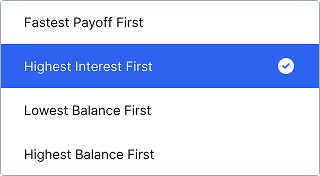
Fastest payoff first – Pays off debts in the shortest time (standard snowball method).
Highest interest first – Saves the most money over time (avalanche method).
Lowest balance first – Pays off the smallest debts first.
Highest balance first – Pays off the largest debts first.
To update your priority:
Select the dropdown menu at the top.
Choose one of the four options—the chart updates automatically.
Debt Chart
The chart shows your payoff progress:
The dotted line represents your timeline with minimum payments.
The colored bars show the snowball method’s impact.
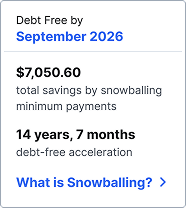
The right panel displays your estimated payoff date and savings.
To see your projected debt at a future date, hover over the timeline.
Debt List
Below the chart, you’ll see a list of your debts, color-coded to match the chart. Each entry shows:
Balance
Interest rate
Estimated payoff date
Minimum payment
Debt Details
To view details for a debt:
Select a debt from the list.
Under Schedule, see future payments broken down by principal and interest.
To update your minimum payment or interest rate:
Select a debt from the list.
Go to Details.
Select the payment or interest rate and enter a new amount.
Hiding Accounts
You can exclude debts from the chart while keeping them in reports.
To hide a debt:
Select the debt.
Open the … menu.
Select Hide from debts.
To re-include it:
Select the hidden debt at the bottom of the list.
Select Include Account.
Extra Payments
To see the impact of extra payments:
Select Total Monthly Paydown.
Enter an amount in Extra Payment Toward Debt—the chart will update with your new savings estimate.